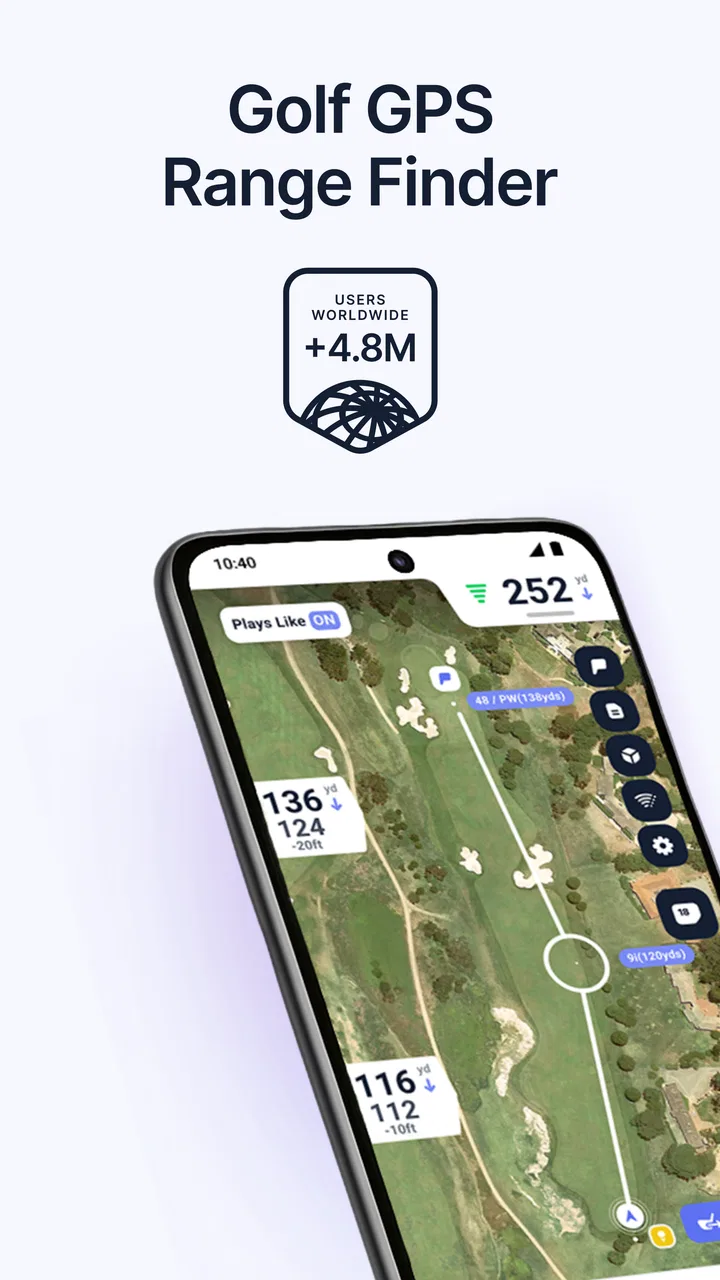
Hole19 Golf GPS & Range Finder
- 4.7
- Rating
- 5.00M
- Installs
- Free
- Price

 Analysis by App-foxy
I found Hole19 Golf GPS & Range Finder most useful when golf is part of a shared household routine rather than an isolated hobby. One person can use it before work, another can check it during a weekend round, and the same phone may occasionally move between players. That makes the practical questions more important than the impressive-sounding label: who is actually using the account, whose score is being recorded, and whether everyone remembers to check the screen before hitting.
My overall impression is that this is a focused golf GPS and scoring app for players who want course information and a digital scorecard in one place. It is free to install, although optional in-app purchases range from $2.99 to $99.99 per item. The app comes from Hole19, sits in the sports category, and has built a strong audience with a 4.7 average from around 31 thousand ratings and over 5 million installs.
I would recommend trying it if you regularly play different courses and want to reduce the amount of paper, mental arithmetic, and switching between separate golf tools. I would be more cautious if you want a complete coaching system, highly detailed club tracking, or a family-oriented app with clearly separated profiles. Hole19 is at its best when one golfer treats it as a practical round companion, not when a whole household expects it to manage every player automatically.
You May Also Like

 Blood Strike: 2.5 Anniversary
Blood Strike’s Loadouts Turn Every Drop Into a Tactical Gamble
A close look at Blood Strike’s custom loadouts: how fast access to signature weapons reshapes its battle royale rhythm, rewards preparation, and narrows the gap between fights.

 Pandora - Music & Podcasts
Pandora’s Music Is Easy to Start, but Harder to Recover
Pandora’s strength is its low-effort path from a seed to a station. Its weak spot is how much confidence it asks you to place in connection, setup, and quiet recovery.

 8 Ball Pool
 Is Built on Rivalries, Rematches, and Routine
A close look at the rivalries, rematches, shared routines, and unanswered safety questions that turn a quick pool match into a persistent mobile community.

 Samsung Music
’s Quiet Strength Is Playing What You Already Own
Its reach comes less from spectacle than from dependable access to a personal library. That simplicity is both the app’s strongest retention engine and its ceiling.

 AccuWeather: Weather Radar
AccuWeather Review: A Quick, Clear Forecast for Everyday Decisions
For everyday plans, the best forecast is the one you can understand quickly. AccuWeather makes rain timing, radar, and local conditions easy to act on, with a few trade-offs.

 Hill Climb Racing
Why Hill Climb Racing Still Turns Crashes Into One More Run
A tiny car, a bumpy hill and one more upgrade: Hill Climb Racing keeps resurfacing because its simple chaos makes every near-miss feel personal.
More From Our News Desk
View All News


How Hole19 fits into a shared golf routine
I’d treat a shared round as a small handoff, not just a phone passed between golfers: before play, agree who is entering scores and ask each player to confirm their result after the hole. That keeps the device useful without letting one person’s routine quietly become everyone else’s. It also gives newer golfers a simple way to join in; next, I’d make that handoff part of the pre-round setup.
A realistic Saturday round
Imagine a household where one person plays every week, another joins occasionally, and a teenager is learning the basics. The regular player can prepare the app before leaving home, while the occasional player can use it during the round without needing a separate paper card. That is the kind of shared-use situation where Hole19 earns its place: the phone becomes a common reference point for distances and scores, but each golfer still needs to understand whose information is being entered.
In my experience, the biggest benefit is not simply seeing a number on the screen. It is having distance information and scoring in the same routine. I can check the hole, choose a club, play the shot, and record the result without carrying a dedicated rangefinder and a separate card. That keeps the process tidy, especially when the group is moving quickly and nobody wants to stop for a long discussion about arithmetic.
There is also a useful social advantage. A group can agree on the score after each hole while the details are still fresh. This is better than trying to reconstruct the round later from memory. For a household that plays together, the app can make the round easier to follow, but I would still say the person entering the score should announce it aloud. That small habit prevents a shared device from quietly becoming a source of confusion.
The phone is shared, the golf identity is not
A shared phone does not automatically mean a shared golf record. If two people use the same device, I would pause before starting a round and check the active player information, score entry, and any settings that affect the current session. A parent using the app for a child, or a couple alternating between rounds, should avoid assuming that the previous golfer’s details have disappeared just because the screen looks ready.
This is one of the less obvious trade-offs of using a personal sports app in a household. The convenience of one device is real, but it creates a boundary between the phone owner and the golfer. My practical rule is simple: one person prepares the round, the actual player confirms the name or scoring context, and the group checks the first hole before continuing. That takes very little time and avoids correcting a whole round later.
Hole19 is therefore better suited to coordinated sharing than anonymous passing around. It can support a group conversation, but I would not treat it as a multi-user household organizer. Each golfer should know whether they are recording their own score, helping someone else, or merely using the distance view. That distinction matters more than the device itself.
Setting boundaries before the first tee
The cleanest setup is to decide what the app will do before play begins. I use it for two jobs: checking the relevant distance and keeping the scorecard current. I do not expect it to replace every piece of golf equipment or teach me how to swing. When those boundaries are clear, the app feels quick and useful instead of becoming another screen demanding attention.
For a shared round, I would agree on three things in advance. First, decide who holds the phone or who is responsible for opening the hole view. Second, decide whether one person records every player or each golfer records only their own score. Third, decide when the score is entered. My preference is immediately after finishing a hole, before moving too far away from the green.
That workflow is especially helpful for occasional players. Someone who is still learning golf may not know which number matters, how to interpret a distance, or when the score should be entered. A regular player can handle the setup while explaining the process gradually. The app then becomes a teaching aid for round organization, rather than an intimidating technical object.
There is a limit, though. I would not hand the phone to a young beginner and assume the experience will be self-explanatory. Golf already involves etiquette, pace, safety, and concentration. A phone can distract from all four if the user keeps adjusting screens after every shot. The adult or experienced player should establish when the device is used and when it goes back into a pocket.
Coordinating distances and scores
The strongest everyday workflow is a short cycle: open the current hole, check the distance that is relevant to the next shot, play, then record the score. Repeating that pattern keeps the app from taking over the round. It also makes the scorecard more reliable because the entry happens while the result is still obvious.
I would avoid treating the displayed distance as a command. It is a planning reference, not a guarantee of what will happen to the ball. Wind, slope, lie, temperature, club choice, and personal ability still matter. A new golfer may need help translating a distance into a sensible shot, while an experienced golfer may use the number as one input among several. The app is useful precisely because it reduces one uncertainty; it does not remove all of them.
For shared use, verbal coordination helps. The person holding the device can say the relevant distance, but the player should make the final decision. This avoids a common household problem in which the phone owner accidentally becomes the group’s unofficial coach. Hole19 can support the conversation, but it should not replace the golfer’s judgment or the group’s normal playing etiquette.
Scoring has a similar boundary. Digital entry is faster than writing on a card once everyone understands the routine, but it is also easier to tap the wrong player or hole when several people are talking. I recommend entering one result at a time and letting the player confirm it. If the group is rushing, a paper backup or a quick verbal note may be less stressful than trying to repair a mistaken sequence later.
What the app is like for different ages
The content rating is Everyone, which makes the app broadly suitable from an age-classification perspective. That does not mean every child will find it appropriate without guidance. A younger golfer may understand the scorecard but not the responsibility that comes with carrying a phone near water, bunkers, carts, or other players. The adult’s supervision still matters.
For teenagers, Hole19 can be a useful bridge between casual play and more deliberate course management. Recording scores encourages attention to each hole, while distance information can prompt questions about club selection. I would frame it as a tool for learning decisions, not as an authority that tells them the correct shot. That approach builds trust and keeps the app from becoming a source of arguments between a parent and a young golfer.
For older relatives or occasional players, the main issue may be readability and confidence rather than golf knowledge. I would open the app before the round, make sure the right screen is visible, and explain only the controls that will actually be used. A simpler routine is better than demonstrating every available option. If the player finds the phone distracting or difficult to handle, a conventional scorecard and a separate rangefinder may be the better choice.
Household trust also includes privacy and account boundaries, even when the app is used casually. I would not assume that one person’s scores, preferences, or round history should be treated as everyone’s. The safest habit is to let each golfer know what is being recorded and to avoid presenting another person’s results as if they were your own. That is basic courtesy, but it becomes important when a shared device blurs ownership.
Where it beats the usual alternatives
The usual alternatives are familiar: a paper scorecard, a dedicated golf rangefinder, or a collection of separate apps for distance, scoring, and practice. Hole19’s appeal is the combined workflow. I can carry one phone instead of managing a card and another device, and I can keep the score close to the distance view. For a casual golfer or a household trying to keep equipment simple, that convenience is meaningful.
Compared with paper, the app is easier to correct and review during the round, and it reduces mental calculation. Paper still wins for speed when the phone battery is low, the weather is unpleasant, or the group wants to avoid screens entirely. A paper card also makes sharing effortless because nobody needs to understand an interface. I would keep that option in mind for family rounds where the technology creates more conversation than value.
Compared with a dedicated rangefinder, the phone-based approach is more versatile but less specialized. A dedicated device may feel faster for a golfer who wants one precise task and nothing else. Hole19 makes more sense for someone who values the combination of course distance and digital scoring. If your priority is maximum simplicity at the moment of the shot, a dedicated tool may suit you better.
Compared with a coaching app, Hole19 is more about managing the round than improving the swing. It can help me think about course decisions, but it is not the first thing I would choose for structured lessons, swing analysis, or a practice plan. That distinction prevents disappointment. The app’s value comes from making play more organized, not from promising to transform technique by itself.
Friction I noticed in everyday use
The first source of friction is attention. Any phone-based golf tool can tempt players to look down too often. In a shared group, that problem grows because one person may be checking the app while others are ready to play. I would use it at natural pauses and put the phone away before addressing the ball. That keeps the technology subordinate to the round.
The second issue is responsibility for entries. A digital scorecard feels authoritative, but it is only as accurate as the person tapping it. In a group with different skill levels, the person entering scores may need to ask for confirmation after every hole. That is not a flaw unique to Hole19, but it is a real limitation of replacing a visible paper card with a private screen.
The third is the difference between free access and optional paid content. The app can be installed without paying, but the presence of in-app purchases means I would check what I actually need before committing to anything. A household sharing one device should be especially clear about who is allowed to make purchases. That is a simple account boundary worth setting before a child or guest starts exploring the app.
Compatibility is another practical consideration. The current version is 5.57.0 and requires at least operating system version 10. On supported devices, that is a straightforward starting point, but anyone using an older phone should check compatibility before planning a round around it. I would also prepare the app before arriving at the course, rather than treating the first tee as the place to solve setup problems.
Who should use it, and who should skip it
I think Hole19 is a good match for golfers who play often enough to value repeatable routines, but who do not want to carry several specialized tools. It also suits mixed-experience groups: an experienced player can manage the setup, while newer golfers learn how distances and scores fit into a round. The free starting point makes it easy to test whether the workflow feels natural before spending money on optional items.
I would skip it if your ideal round is completely screen-free, if you already own a rangefinder and prefer a separate paper card, or if you are specifically searching for advanced coaching. I would also hesitate to make it the central tool for a large household group unless one person is willing to coordinate the entries. The app can support shared play, but it does not remove the need for clear human organization.
The developer, Hole19, has kept the product focused enough that I can understand its role quickly. Its scale is also reassuring: it has passed the five-million-install mark and has around 1.1 thousand written reviews alongside its larger rating total. Those figures do not guarantee that every golfer will enjoy the interface, but they suggest this is an established sports app rather than an experiment I would worry about relying on immediately.
My household verdict
After using it as a practical round companion, I see Hole19 as a strong middle ground between paper and dedicated golf hardware. It gives me a more organized way to approach distances and scores without asking me to carry a full equipment case of electronics. The best results come from a disciplined routine: prepare the round, confirm who is playing, use the distance as guidance, and enter scores while everyone agrees on them.
For a household, the key is not whether several people can touch the same phone. The key is whether everyone understands the boundaries. One account or one device should not be treated as a magical shared identity. Let the actual golfer confirm the score, keep purchases under adult control, and make sure younger users know when the screen should be put away. Those habits make the app more useful and reduce avoidable tension.
Its broad Everyone rating, free entry point, and support for supported devices running operating system version 10 or later make it approachable for many golfers. Optional purchases mean I would still review the choices carefully, especially on a family device. I would not describe it as a replacement for every golf tool, but I would happily suggest it to a friend who wants distances and scoring in one golfing routine.
My final judgment is positive, with one condition: use it to simplify the round, not to dominate it. If you want a convenient sports app for course decisions and scorekeeping, Hole19 is worth trying. If your household needs separate identities, formal supervision tools, or deep technical coaching, look elsewhere or combine it with simpler equipment. For ordinary shared rounds, though, Hole19 offers a sensible balance of convenience, useful information, and enough flexibility to fit different kinds of golfers.
FAQs for Hole19 Golf GPS & Range Finder
01What is Hole19 Golf GPS & Range Finder used for?
Hole19 is a golf companion app designed to help players plan and track their rounds. It provides GPS distances to the front, middle, and back of greens, course maps, scorekeeping, statistics, and other useful tools. During testing, the app was particularly helpful for checking distances before shots and keeping scores digitally instead of carrying a separate scorecard.
02Does Hole19 support my golf course and provide accurate GPS distances?
Hole19 includes a large database of golf courses, but coverage and map quality can vary depending on the location. Before downloading, it is worth searching for your home course or the courses you regularly play. GPS distances are useful for general shot planning, although accuracy may be affected by phone positioning, weather, terrain, or course-map limitations, so the readings should be treated as guidance rather than professional surveying equipment.
03Can I use Hole19 without an internet connection while playing golf?
Hole19 may require an internet connection to download course information, synchronize data, or access certain online features. For a smoother experience, open the app and load the required course before arriving at the club, especially if mobile coverage is weak. Some functionality may remain available offline after the course data has been prepared, but users should not assume every feature works without connectivity.
04Is Hole19 free, or does it require a premium subscription?
Hole19 offers core golf features at no cost, but some advanced tools may be restricted to a paid Premium plan. Depending on the current version, premium benefits can include enhanced course information, additional planning features, deeper statistics, or an ad-free experience. The exact pricing and available features can change, so review the subscription details in the Google Play Store or Apple App Store before confirming a purchase.
05Does Hole19 work on both Android and iPhone, and what permissions does it need?
Hole19 is available for Android and iOS devices, although supported versions and performance can differ between phones. The app normally needs location permission to calculate GPS distances and may request access to internet connectivity, notifications, or account-related functions. Location services can use noticeable battery power during a round, so starting with a full charge and carrying a power bank is sensible for longer games.
Pros
- Accurate GPS distances to greens
- hazards
- and layup points
- Large database of courses across many countries
- Simple scorecard makes tracking rounds quick and convenient
- Shot tracking helps golfers review club performance
- Apple Watch support provides distances without checking the phone
Cons
- Many advanced features require a paid Premium subscription
- GPS use can noticeably reduce battery life during a full round
- Course data may be incomplete or outdated at some locations
- Requires a clear view of the sky for reliable distance readings
- Some screens and features feel overwhelming for casual golfers

Hole19 Golf GPS & Range Finder
Gallery